High Availability Overview
High availability (HA) refers to a system or application that offers high operational availability. This means the entire site or application won’t be down if one server goes down due to traffic overload or other issues. HA represents the application remains available with no interruption. We achieve high availability when an application continues to operate even when one or more underlying components fail.
Thus, HA is designed to avoid loss of service by reducing or managing failures and minimizing unscheduled downtime (when your system or network isn’t available for use or is unresponsive) that happens due to power outages or failure of a component.
Chef Automate High Availability (HA)
The Chef Automate HA equates to reliability, efficiency, and productivity, built on Redundancy and Fail-over. It aids in addressing significant issues like service failure and zone failure.
Chef Automate HA Architecture
HA architecture includes Chef Automate, Chef Infra Server, PostgreSQL, and OpenSearch.
Note
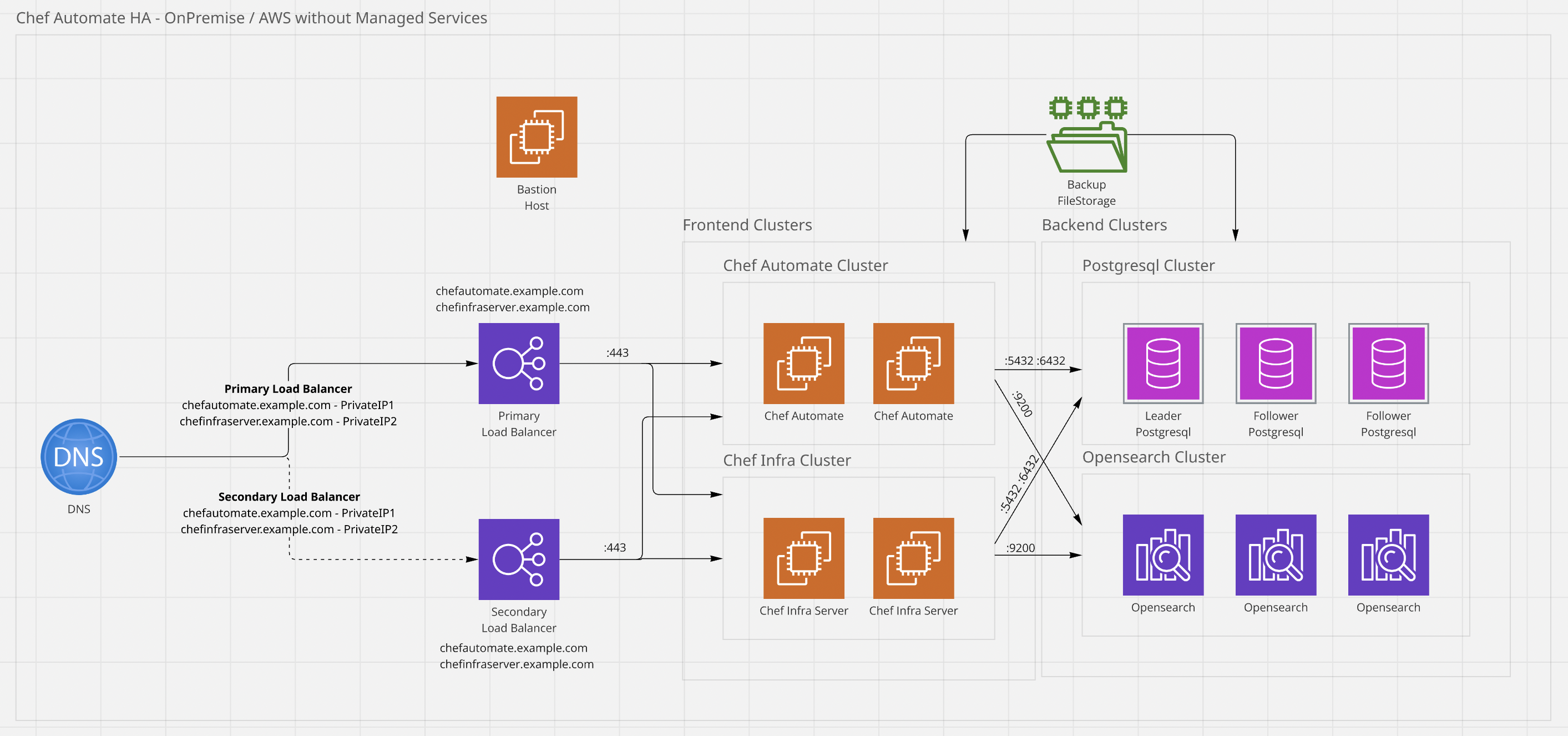
chef-automate verify command depends on successful connectivity to port 7799 on each node to perform its validations correctly.Chef Automate HA Architecture for OnPremise / Cloud Non-Managed
Note
In Chef Automate HA architecture for on-premises or non-managed Cloud deployments, frontend nodes connect to PostgreSQL over port 5432 and use port 6432 to perform leader checks.
Chef has deprecated the earlier configuration that required frontend nodes to use port 7432 for PostgreSQL connectivity.
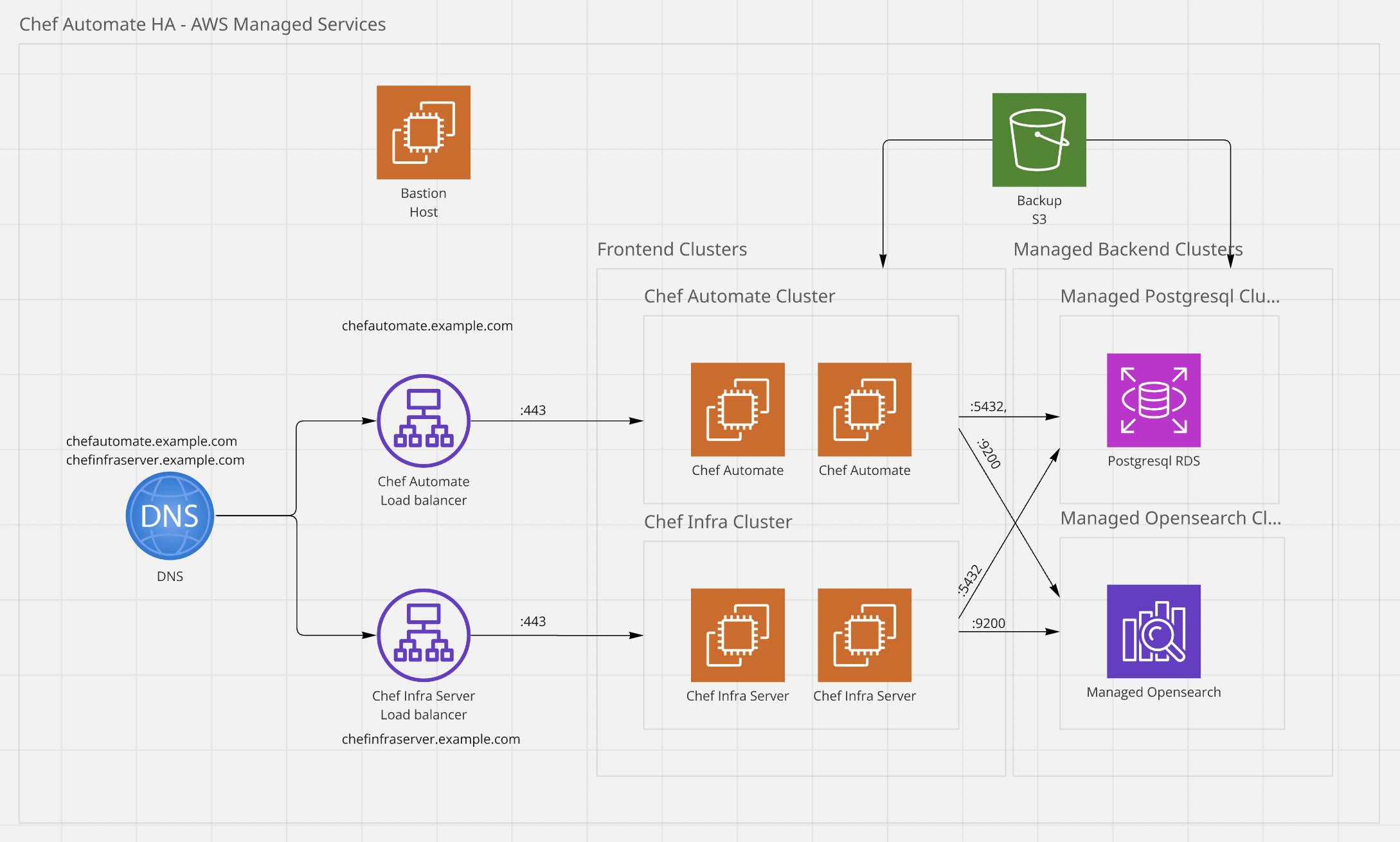
Chef Automate HA Architecture for AWS Managed
Note
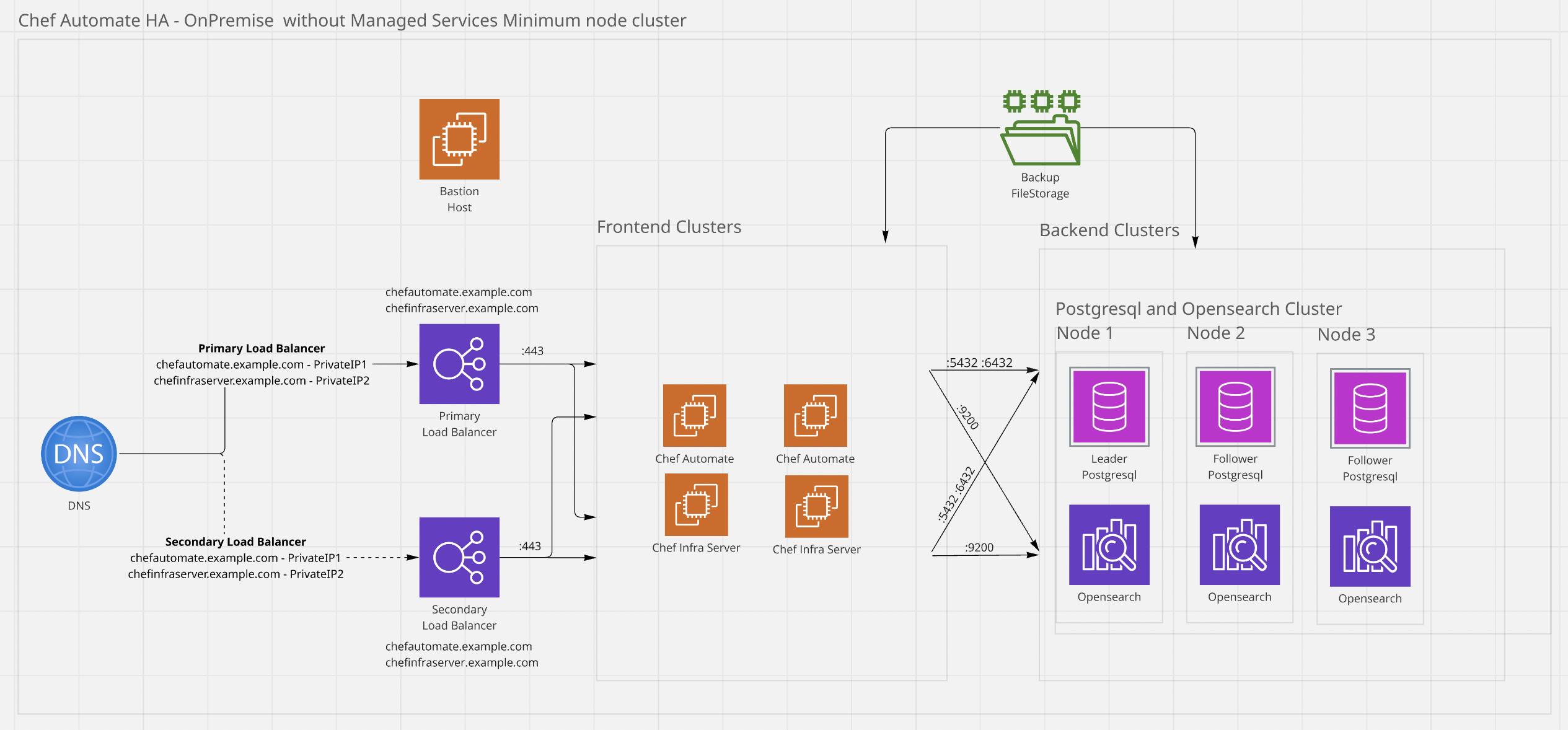
Chef Automate HA Architecture for On-Premises Non-Managed Minimum Node Cluster
The following shows a five-node cluster, which is a supported deployment pattern. Work with your Progress technical teams to determine the appropriate cluster configuration for optimal performance based on parameters such as node count and data size.
Note
In Chef Automate HA architecture for on-premises or non-managed Cloud deployments, frontend nodes connect to PostgreSQL over port 5432 and use port 6432 to perform leader checks.
Chef has deprecated the earlier configuration that required frontend nodes to use port 7432 for PostgreSQL connectivity.
Warning
- Choose Minimum node deployment type when you have VM constraints.
- Minimum node deployment is only for on-premises deployments
- Minimum node deployment isn’t supported for AWS deployments
Chef Automate HA Topology
The Chef Automate HA Architecture involves the following clusters as part of the main cluster:
Backend Cluster (Persistent Services)
PostgreSQL: Database requires a minimum of three nodes. PostgreSQL database uses the Leader-Follower strategy, where one becomes a leader, and the other two are the followers.
OpenSearch: Database requires a minimum of three nodes. OpenSearch database manages the cluster internally.
Frontend Cluster (Application Services)
Provisioning
Chef Automate’s high availability solution can run on cloud providers and on-premises infrastructure systems. Appropriately provisioned backend, frontend, and bastion systems ensure a smooth deployment and installation experience.
- On-premises provisioning
- Cloud provisioning
On-premises provisioning
The customer can provision virtual machines or bare metal machines on a supported operating system with the required system settings to deploy the Automate HA solution.
Cloud provisioning
Chef Automate is supported on the following cloud providers:
- AWS
- Azure
Deploy Chef Automate HA on cloud infrastructure after provisioning the cloud systems.
Deployment methods
Chef Automate High Availability (HA) supports two types of deployment:
- [on-premises Deployment (Existing Node) Deployment](/automate/ ha_on_premises_deployment_procedure/)
- Amazon Web Services (AWS) Deployment
On-premises deployment (Existing Node/Bare Infrastructure)
In this, we expect VM (Virtual machine) or Bare Metal machines (Physical machine) that are already created and have initial Operating System (OS) setup done. Including Ports and Security policies changed according to requirements.
After this, installation steps will Deploy Chef Automate, Chef Infra Server, PostgreSQL DB, and OpenSearch DB to the relevant VMs or Physical Machines as provided in Config.
See the performance benchmarking documentation for more information.
Cloud deployment using Amazon Web Services (AWS)
The two-step deployment process is as shown below:
- Provisioning Infrastructure. (Optional, if already manually done)
- Deployment of services on the provisioned infrastructure.
- Installation of PostgreSQL, OpenSearch, Chef Automate, and Chef Infra Server will be done in this step.
Cloud deployment using Azure
The two-step deployment process is as shown below:
- Provisioning Infrastructure: Manually provision the infrastructure
- Deployment of services on the provisioned infrastructure (follow the [on-premises deployment procedure](/automate/ ha_on_premises_deployment_procedure/)).
- Installation of PostgreSQL, OpenSearch, Chef Automate, and Chef Infra Server will be done in this step.
- Only File System Backup and Restore are supported.
Cloud deployment using Google Cloud Platform (GCP)
The two-step deployment process is as shown below:
- Provisioning Infrastructure: Manually provision the infrastructure
- Deployment of services on the provisioned infrastructure (follow the [on-premises deployment procedure](/automate/ ha_on_premises_deployment_procedure/)).
- Installation of PostgreSQL, OpenSearch, Chef Automate, and Chef Infra Server will be done in this step.
Performance (Benchmarking)
Please refer to the Performance Benchmarking document for the detailed performance benchmark numbers